I’ve been toying with Azure Data Factory lately and especially with Data flows. It’s a graphical, low-code tool made for doing data transformations in cloud environment in a serverless manner. I got an idea of doing a little comparison between it and good old SQL from both performance and billing point of a view. My idea was to create a denormalized, a.k.a. wide table, by joining multiple tables together using both Data flows and SQL. I used AdventureWorks2019 sample database as a data source and combined 7 tables of sales related data and end result was like this:

Database I provisioned was the slowest and cheapest Azure SQL Database I could find: Basic tier which costs about whopping 4€ per month.
Result table contained 121 317 rows and the stored procedure, which populated it, was this:
SET ANSI_NULLS ON
GO
SET QUOTED_IDENTIFIER ON
GO
CREATE PROCEDURE [dbo].[uspCurated]
AS
   SET NOCOUNT ON;

TRUNCATE TABLE dbo.curated_sp;

INSERT INTO dbo.curated_sp
SELECT h.SalesOrderNumber, h.OrderDate, h.DueDate, h.ShipDate
      ,d.OrderQty, d.UnitPrice, d.UnitPriceDiscount, d.LineTotal
      ,p.ProductNumber, p.name as ProductName
      ,pg.Name as ProductSubcategoryName
      ,pcg.Name as ProductCategoryName
      ,pm.Name as ProductModelName
      ,c.AccountNumber
FROM [Sales].[SalesOrderHeader] h
  INNER JOIN [Sales].[SalesOrderDetail] d on h.SalesOrderID=d.SalesOrderID
  INNER JOIN [Production].[Product] p on d.ProductID=p.ProductID
  INNER JOIN [Production].[ProductSubcategory] pg on p.ProductSubcategoryID=pg.ProductSubcategoryID
  INNER JOIN Production.ProductCategory pcg on pg.ProductCategoryID=pcg.ProductCategoryID
  INNER JOIN [Production].[ProductModel] pm on p.ProductModelID=pm.ProductModelID
  INNER JOIN [Sales].[Customer] c on h.CustomerID=c.CustomerID;
GO
For Data flows I configured a runtime which type was General purpose and it had 8 cores. Pipeline I built is like the one below. Notice that not all sources are visible here but you get the idea:
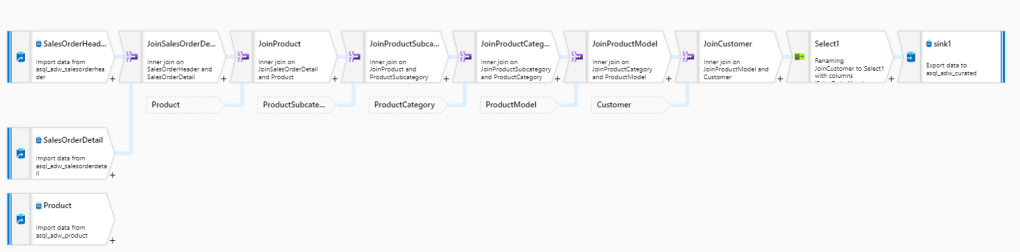
I used SalesOrderHeader as a starting point into which I joined other tables using Join transformation. Before saving end result back into database, there’s also a Select operator for filtering out unwanted columns after which the result set is pushed into table.
Both constructs (Data flow and Stored procedure) were placed into their own pipelines which both were scheduled to be run once in an hour for 1 day. So in total both ran 24 times. Here’s the statistics of running times in seconds:
| Run Id | Duration (sec), Data flow | Duration (sec), Stored procedure |
|---|---|---|
| 1 | 552 | 84 |
| 2 | 373 | 84 |
| 3 | 523 | 84 |
| 4 | 340 | 86 |
| 5 | 372 | 85 |
| 6 | 552 | 86 |
| 7 | 554 | 84 |
| 8 | 582 | 85 |
| 9 | 400 | 85 |
| 10 | 555 | 85 |
| 11 | 371 | 83 |
| 12 | 371 | 86 |
| 13 | 345 | 84 |
| 14 | 550 | 84 |
| 15 | 372 | 85 |
| 16 | 554 | 84 |
| 17 | 341 | 84 |
| 18 | 342 | 84 |
| 19 | 371 | 84 |
| 20 | 372 | 84 |
| 21 | 552 | 86 |
| 22 | 354 | 86 |
| 23 | 371 | 85 |
| 24 | 371 | 118 |
| Average: | 435 | 92 |
Stored procedure was both way more constant and a lot faster combined to Data flow. Let’s dive deeper into Data flow duration. What I found out was that warm up time of Spark cluster (which is technology behind Data flows) can be quite long. Here’s a sample of Run # 1 which took 9 minutes and 12 seconds to run in total. 5 minutes was spent just waiting for cluster to be ready:
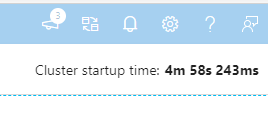
Now that’s a long time! According to documentation, startup time varies between 4-5 minutes. In my test runs, which were done in Azure West Europe region, the average was approx. 3 minutes. Here’s the statistics but remember that your mileage may vary:
| Run Id | Total duration (sec) | Cluster startup time (sec) | Actual runtime (total – startup) |
|---|---|---|---|
| 1 | 552 | 298 | 254 |
| 2 | 373 | 102 | 271 |
| 3 | 523 | 282 | 241 |
| 4 | 340 | 96 | 244 |
| 5 | 372 | 130 | 242 |
| 6 | 552 | 290 | 262 |
| 7 | 554 | 303 | 251 |
| 8 | 582 | 326 | 256 |
| 9 | 400 | 140 | 260 |
| 10 | 555 | 284 | 271 |
| 11 | 371 | 103 | 268 |
| 12 | 371 | 126 | 245 |
| 13 | 345 | 103 | 242 |
| 14 | 550 | 289 | 261 |
| 15 | 372 | 130 | 242 |
| 16 | 554 | 291 | 263 |
| 17 | 341 | 92 | 249 |
| 18 | 342 | 103 | 239 |
| 19 | 371 | 103 | 268 |
| 20 | 372 | 109 | 263 |
| 21 | 552 | 307 | 245 |
| 22 | 354 | 103 | 251 |
| 23 | 371 | 98 | 273 |
| 24 | 371 | 97 | 274 |
| Average: | 435 | 179 | 256 |
Cluster startup times vary quite a lot from 1.5 minutes to 5 minutes. Actual runtime (the time from cluster being ready to end of execution) is much more constant. Using SQL we got all done in 1.5 minutes but just to get the Spark cluster up and running takes double!
Conclusions
If you already have your data in database then why not utilize its’ computing power to do data transformations? I mean it’s old technology and being old in this context is a good thing: Relational databases have been around more than 40 years which means those are well understood, well optimized and there’s a lot of scientific research behind those. Good old relational databases are still a valid solution for handling structured data.
Someone might say that test wasn’t fair and yes, I can relate to that. I mean data didn’t have to move out from SQL DB and then place back when using plain SQL. But then again should one move it to do some basic manipulations just that one could utilize some new and shiny low-code tool? I don’t think so: SQL is the lingua franca for data engineers and there’s a big pool of devs familiar with it.
Even starting the Spark cluster took more time than getting things done with SQL. And guess what’s fun about this? You also pay for the cluster warmup time! But more of this and the whole cost of these two methods on part 2. Stay tuned!
 plumbing.data.blog